
Quick Capture
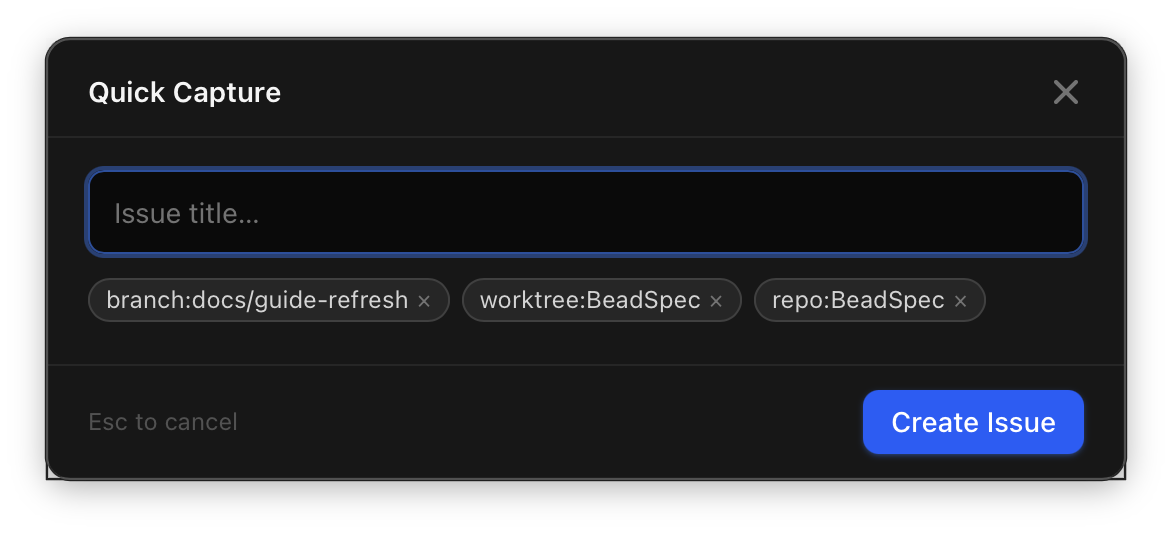
Quick Capture is a small floating window for creating issues without switching apps. It appears over any window and dismisses itself after you submit.
Global shortcut
| Platform | Default shortcut |
|---|---|
| macOS | ⌘⇧N |
| Windows / Linux | Ctrl+Shift+N |
The shortcut works even when BeadSpec is not in the foreground. BeadSpec must be running (it can be minimized or in the system tray).
The shortcut can be changed in Settings → Quick Capture.
What you can capture
The Quick Capture window lets you set:
- Title (required)
- Priority (P0–P4, defaults to P2)
More fields (labels, description, assignee) can be added after capture by opening the issue in the full task list.
Workspace context chips
If BeadSpec has an active project open, Quick Capture automatically shows label chips for the current branch, worktree, and repo — and applies those labels to the new issue. This means issues created via Quick Capture are automatically tagged with the right context, making them easy to find later with bd list or the filter bar. The same branch:/worktree:/repo: label convention is used by the Ruflo filter chips in the full task list.
Submitting
Press Enter (or click Add) to create the issue. The window dismisses automatically. The issue appears in the task list within a second or two via real-time sync.
Press Escape to dismiss without creating an issue.
Troubleshooting
The shortcut doesn't work:
- Confirm BeadSpec is running (check the menu bar / system tray)
- On macOS, go to System Settings → Privacy & Security → Accessibility and confirm BeadSpec has permission
- Check for shortcut conflicts with other global shortcut apps (e.g. Raycast, Alfred)
- Try changing the shortcut in Settings → Quick Capture if the default conflicts with another app